
Please note : This help page is not for the latest version of Enterprise Architect. The latest help can be found here.
Compartments
In addition to the attributes and operations compartments shown in a Class element, Enterprise Architect also supports other compartments that can optionally be displayed.
To set the visibility of the various compartments, see Feature Visibility.
Tags Compartment
The tags compartment lists all Tagged Values for an element as entered in the Tagged Values window.

Or, in the fully qualified, expanded format:

Note: |
The fully-qualified option operates only on those Tagged Values that were created in Enterprise Architect release 7.1 or later. It does not expand Tagged Values created in earlier releases. |
Responsibility Compartment
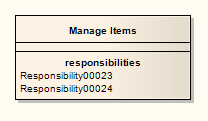
The responsibility compartment shows a list of responsibilities as entered on the Requirements tab of the element Properties dialog.
Constraint Compartment
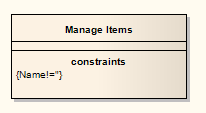
The constraint compartment shows a list of element constraints as entered in the Constraints tab of the element Properties dialog.
Testing Compartment
The testing compartment lists all of the tests associated with an element as listed in the Testing window (select the View | Testing menu option).
Maintenance Compartment
The maintenance compartment lists all of the defects, changes, issues and tasks associated with an element, as listed in the Maintenance window (select the View | Other Element Tools | Maintenance menu option).
