
Please note : This help page is not for the latest version of Enterprise Architect. The latest help can be found here.
BPEL Model Validation
You can use the Enterprise Architect Model Validation facility to check the validity of the BPEL model. You can validate an entire BPEL Process or a single BPMN element. Note that Enterprise Architect checks for both the UML and the BPEL rules by default. To enable only BPEL rule validation, select only the BPEL Rules checkbox in the Model Validation Configuration dialog.

Example Model Violation
The following model shows several basic BPEL violations:

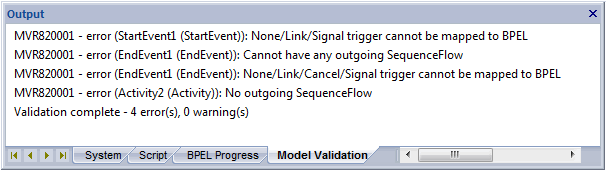
- StartEvent1 has its trigger set to None, which cannot be mapped to BPEL.
- EndEvent1 has its trigger set to Cancel, which cannot be mapped to BPEL.
- EndEvent1 cannot have any outgoing SequenceFlows, as it represents the end of a process.
- Activity2 has no outgoing SequenceFlows. Enterprise Architect expects only an EndEvent to represent the end of a process.
If you run Model Validation on this diagram, Enterprise Architect lists the violations in the Output window, as shown:
See Also
- BPEL Models
- Create a BPEL Model
- Create Assignments
- Model a BPEL Process
- Generate BPEL
- Create a BPEL Web Service
The material ("material" includes all pages, documents and on-line graphics) on this web site is protected by copyright law. (C) 1998-2010 Sparx Systems Pty Ltd.
