Please note : This help page is not for the latest version of Enterprise Architect. The latest help can be found here.
Denote Lifecycle of an Element
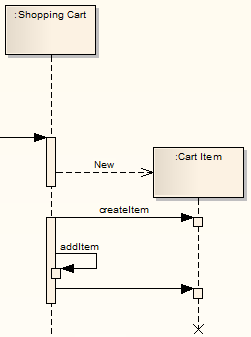
You can capture element lifetimes using messages that are denoted as New or Delete message types. To do this, follow the steps below:
- Double-click on a message within a Sequence diagram to display the Message Properties dialog.
- In the Lifecycle field, click on the drop-down arrow and select New or Delete.
- Click on the OK button to save the changes.
The example below shows two elements that have specific creation and deletion times.
Note: |
To show the termination X on the lifeline in the following example diagram, you must switch on garbage collection: Tools | Options | Diagram | Sequence | Garbage Collect. |
The material ("material" includes all pages, documents and on-line graphics) on this web site is protected by copyright law. (C) 1998-2010 Sparx Systems Pty Ltd.