Please note : This help page is not for the latest version of Enterprise Architect. The latest help can be found here.
Drawing Methods
Method Name |
Description |
||
addsubshape( |
Adds a sub-shape with the name shapename that must be defined within the current shape definition. |
||
arc( |
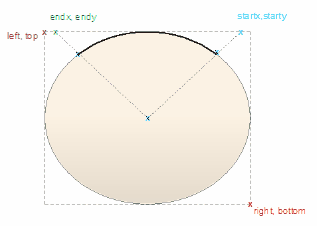
Draws an elliptical anticlockwise arc with the ellipse having extents at left, top, right and bottom. The start point of the arc is defined by the intersection of the ellipse and the line from the center of the ellipse to the point (startingpointx, startingpointy). The end of the arc is similarly defined by the intersection of the ellipse and the line from the center of the ellipse to the point (endingpointx, endingpointy). For example: Arc(0, 0, 100, 100, 95, 0, 5, 0);
|
||
arcto( |
As for the arc method, except that a line is drawn from the current position to the starting point of the arc, and then the current position is updated to the end point of the arc. |
||
bezierto( |
Draws a bezier curve and updates the pen position. |
||
defSize(int width, int height) |
Sets the default size of the element. This can appear in IF and ELSE clauses with different values in each, and causes the element to be resized automatically each time the values change. For example: if(HasTag("horizontal","true")) { When this is set, [Alt]+[Z] also resizes the shape to the defined dimensions.
|
||
drawnativeshape() |
Causes Enterprise Architect to render the shape using its usual, non-Shapescript notation. Subsequent drawing commands are super-imposed over the native notation. This method is only enabled for element Shape Scripts; line Shape Scripts are not supported. |
||
ellipse( |
Draws an ellipse with extents defined by left, top, right and bottom. |
||
endpath() |
Ends the sequence of drawing commands that define a path. |
||
fillandstrokepath() |
Fills the previously defined path with the current fill color, then draws its outline with the current pen. |
||
fillpath() |
Fills the previously defined path with the current fill color. |
||
hidelabel( |
Hides the label specified by labelname. |
||
image( |
Draws the image that has the name imageId in the Image Manager.
|
||
lineto( |
Draws a line from the current cursor position to a point specified by x and y, and then updates the pen cursor to that position. |
||
moveto( |
Moves the pen cursor to the point specified by x and y. |
||
polygon( |
Draws a regular polygon with center at the point (centerx, centery), and numberofsides number of sides. |
||
print( |
Prints the specified text string.
|
||
printifdefined( |
Prints the truepart if the given property exists and has a non-empty value, otherwise prints the optional falsepart.
|
||
println( |
Appends a line of text to the shape and a line break.
|
||
printwrapped( |
Prints the specified text string, wrapped over multiple lines if the text is wider than its containing shape.
|
||
rectangle( |
Draws a rectangle with extents at left, top, right, bottom. Values are percentages. |
||
roundrect( |
Draws a rectangle with rounded corners, with extents defined by left, top, right and bottom. The size for the corners is defined by abs_cornerwidth and abs_cornerheight; these values do not scale with the shape. |
||
setdefaultcolors() |
Returns the brush and pen color to the default settings, or to the user-defined colors if available. See Color Queries. |
||
setfillcolor( setfillcolor( |
Sets the fill color. You can specify the required color by defining RGB values or using a color value returned by any of the Color Queries; for example: GetUserFillColor() |
||
setlinestyle( |
Changes the stroke pattern for commands that use the pen. Parameters: string linestyle: the following styles are valid:
|
||
setorigin( |
Positions floating text labels relative to the main shape. relativeTo is one of N, NE, E, SE, S, SW, W, NW, CENTER xOffset and yOffset are in pixels, not percentage values, and can be negative. |
||
setpen( |
Sets the pen to the defined color and optionally sets the pen width.
|
||
setpencolor( setpencolor( |
Sets the pen color. You can specify the required color by defining RGB values or using a color value returned by any of the Color Queries; for example: GetUserFillColor()
|
||
setpenwidth( |
Sets the width of the pen. Pen width should be between 1 and 5.
|
||
showlabel( |
Reveals the hidden label specified by labelname. |
||
startcloudpath( |
Similar to StartPath, except that it draws the path with cloud-like curved segments (puffs). Parameters:
|
||
startpath() |
Starts the sequence of drawing commands that define a path. |
||
strokepath() |
Draws the outline of the previously defined path with the current pen. |