
Please note : This help page is not for the latest version of Enterprise Architect. The latest help can be found here.
Create BPEL 2.0 Model Structure
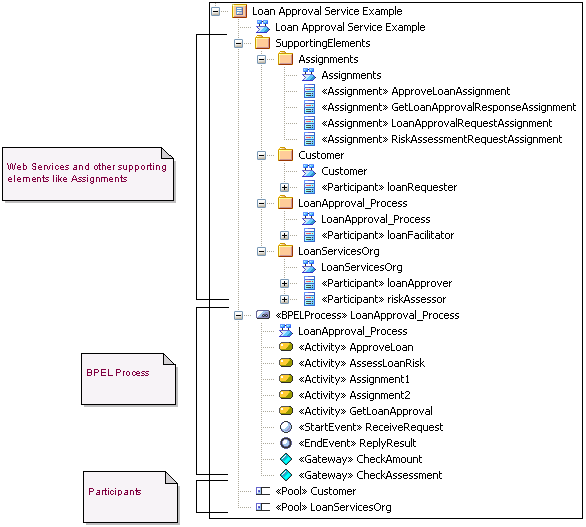
A BPEL 2.0 model consists of a BPEL Process ( containing a BPEL diagram and mappable BPMN 2.0 constructs ) and other supporting elements ( like BPMN 2.0 Assignment, BPMN 2.0 Operation ) required for generating a BPEL 2.0 code. A sample BPEL 2.0 package structure can be created in the Project Browser, using the Select Model(s) (Model Wizard) dialog. You can use this package structure as a template for developing your BPEL Process.
Access:
- Right-click on a package in the Project Browser and select the following context menu : Add | Add a New Model using Wizard ( or )
- Select the New Model from Pattern icon in the Project Browser toolbar
Use to:
- Create a new BPEL 2.0 package structure that can be used as a staring point for developing your BPEL Process.
How to:
Step |
Action |
See also |
1 |
Select the root node or a package in the Project Browser |
|
2 |
Click on the New Model from Pattern icon in the Project Browser |
|
3 |
Select the value BPMN 2.0 in the Technology section |
|
4 |
Check the option BPEL 2.0 Model in the Name section |
|
5 |
Click on the OK button to create the sample BPEL 2.0 package structure |
|
Example BPEL 2.0 Package Structure:
The BPEL Process LoanApproval_Process acts as container for the BPEL diagram and elements. The SupportingElements package contains supporting components like Assignments and Web Service Operations.
Learn More:
