|
|
|
|
Use Alias if Available
|
Display the element alias as the name if the alias is specified.
|
|
Show Additional Parents
|
Show the name of all parents not in the current diagram for all Classes and interfaces.
|
|
Show Page Border
|
Show a page border to align elements with.
|
|
Show Diagram Details
|
Show diagram details in a note in the top left corner of the diagram.
Deselect the option to hide the diagram details.
|
|
Show Sequence Notes
|
Show the Sequence Notes on the current diagram.
|
|
Show Namespace
|
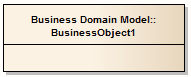
Show the namespace of each element on the diagram, as part of the element name
|
|
Fully Qualified Namespace
|
(If Show Namespace is selected) show the fully qualified namespace of each element on the diagram, under the element

|
|
Hand Drawn
|
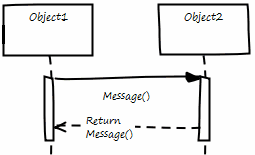
Display the diagram contents as if they had been roughly drawn by hand

|
|
Whiteboard Mode
|
Displays the diagram as if it had been drawn on a whiteboard, with white fill and background
|
|
Disable fully scoped object names
|
Prevent the display of fully-qualified object names on the diagram.
|
|
Page Setup
|
Adjust the scaling of the image according to the size of the page it is to be printed on.
|
Scale Image to Page Size
|
Print Page Header and Page Footer
|
Add page headers and footers to a print-out of the diagram; the headers and footers are generated from the diagram characteristics, such as the name of the creator and the date of modification.
|
|
Always Open as Element List
|
Always display the diagram contents as a Diagram List rather than as a diagram.
|
Diagram List
|
Always Open as Gantt
|
Always display the diagram contents as a Gantt chart.
|
|
Set Layout Style
|
Define the layout of the diagram, to be applied automatically when you select the Layout Diagram options.
|
Layout Diagram
|
RTF Document Options
|
Options for generating RTF reports for a particular diagram.
|
Document Options
|
Exclude image from RTF documents
|
Exclude this diagram image from any RTF document generated on the parent package or element.
|
|
Document each contained element in RTF
|
Include documentation on each element in this diagram, in any RTF document generated on the parent package or element.
|
Generate RTF Documentation
|
Divide Diagram into Multiple Pages
|
Divide each large diagram into separate pages in the RTF document.
|
Scaled to page
|
Rotate Images
|
Rotate each diagram image by 90 degrees in the RTF document.
|
|

