
Please note : This help page is not for the latest version of Enterprise Architect. The latest help can be found here.
Business Rules
Note: |
Business Rule Modeling is available in the Business and Software Engineering edition and Ultimate edition of Enterprise Architect. |
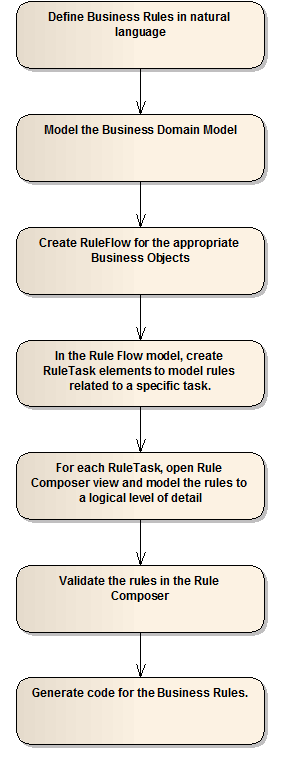
To model Business Rules in Enterprise Architect, you work through the following steps:
- Create a Rule model to define business rules.
- Create a Business Domain model, which provides the business vocabulary for defining business rules.
- Create a Rule Flow model, which groups the rules for a specific task under a Rule Task, and provides the order in which the business rules are executed.
- Model the rules in the Rule Composer, which enables the rules to be transformed to a logical level of detail.
- Validate the rules in the Rule Composer.
- Generate code for the business rules using Enterprise Architect's general code generation methods.
These steps are represented graphically in the following flow:
Create a Business Rule Model
You can create a Business Rule Model from a template provided with Enterprise Architect. To do this, follow the steps below:
- In the Project Browser, either:
- Click on the New Model From Pattern icon in the toolbar
- Right-click on a model root node and select the Add a New Model using Wizard context menu option, or
- Right-click on a package and select the Add | Add a New Model using Wizard context menu option.
The Select Model(s) dialog displays.
- In the Select From field, click on the drop-down arrow and select Business Rule Model. Alternatively, if it is listed in the Technology panel, select the Business Rule Model item.
- In the Name panel, select the checkbox next to the Business Rule Model icon.
- Click on the OK button.
The following model structure is created in the Project Browser:

The Business Rules Model diagram, shown below, encapsulates the components of the Business Rules model.

The material ("material" includes all pages, documents and on-line graphics) on this web site is protected by copyright law. (C) 1998-2010 Sparx Systems Pty Ltd.
