
Please note : This help page is not for the latest version of Enterprise Architect. The latest help can be found here.
Create a Table
What is a Table?
The basic modeling structure of a relational database is the Table. A Table represents a set of records, or rows, with the same structure.
The UML Data Modeling Profile represents a Table as a stereotyped Class; that is, a Class element with a stereotype of table applied to it. A table icon is shown in the upper right corner of the image when it is shown on a Data Model diagram.
Create a Table
To create a Table, follow the steps below:
- Select a diagram.
- Select the More Tools | Data Modeling menu option on the Toolbox.
- Click on the Table element in the list of elements, then click on the diagram. The Table element is displayed on the diagram.
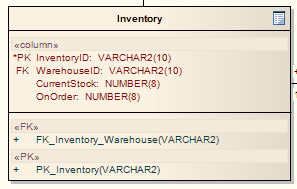
- If the Class: Table n Properties dialog does not display, double-click on the Table to display it.
- In the Name field, type a name for the Table and set any other properties as required.
- Click on the OK button.
The material ("material" includes all pages, documents and on-line graphics) on this web site is protected by copyright law. (C) 1998-2010 Sparx Systems Pty Ltd.
