
Please note : This help page is not for the latest version of Enterprise Architect. The latest help can be found here.
Set MySQL Options
In MySQL, to make use of foreign keys you must declare the table type as InnoDB. To do this, follow the steps below:
- Select the Tagged Values tab of the table Properties dialog. The Tagged Values tab shows the tags for the table.
- Click on the New Tag button
 . The Tagged Value dialog displays.
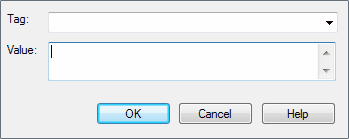
- In the Tag field, type the tag name Type. In the Value field, type InnoDB as the value for the Type tag.
- Click on the OK button to confirm the operation. Generated DDL includes the table type in the SQL script.
- To allow for later versions of MySQL, additional table options that can be added in the same manner include:
Tag |
Value (Example) |
ENGINE |
InnoDB |
CHARACTER SET |
latin1 |
CHARSET |
latin1 |
COLLATE |
latin1_german2_ci |
The material ("material" includes all pages, documents and on-line graphics) on this web site is protected by copyright law. (C) 1998-2010 Sparx Systems Pty Ltd.
