Please note : This help page is not for the latest version of Enterprise Architect. The latest help can be found here.
Project Browser Indicators
Packages under version control are identified in the Project Browser by icons that indicate the current status of the package.
Icon |
Indicates that... |
|
This package is controlled and is represented by an XMI file on disk. Version control either is not being used or is not available. You can edit the package. |
|
This package is version controlled and checked out to you, therefore you can edit the package. |
|
This package is version controlled and not checked out to you, therefore you cannot edit the package (unless you check the package out). |
|
This package is version controlled, but you checked it out whilst not connected to the version control server. You can edit the package but there could be version conflicts when you check the package in again. |


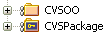
For example, below, CVSOO and CVSPackage are configured for version control. CVSOO is checked out to you, and CVSPackage is not.