
Please note : This help page is not for the latest version of Enterprise Architect. The latest help can be found here.
Tabular Sections
The RTF Style Template Editor supports rendering a document section as a table. A tabular section is defined as a table containing any number of columns, but with only two rows:
- The first row is used to describe the headings of the columns, which you type in and format yourself
- The second row defines the output, which you specify by right-clicking in each cell and selecting the output type from the field list; the output is then generated iteratively for every occurrence of the section in question.
Notes: |
||||||||||||||||||
This generates the following table:
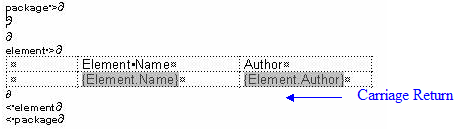
Line Space
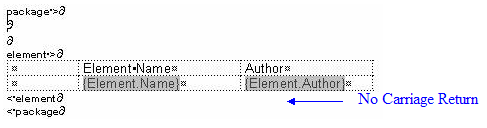
To avoid this, ensure that there is no carriage return between the end of the table and the section terminator, as follows:
This generates a table with no space between the rows, as follows:
|
||||||||||||||||||
|
Example Tabular Section
In the following example, the Model> Glossary> section is defined as a tabular section:

This renders the following document output:

