
Please note : This help page is not for the latest version of Enterprise Architect. The latest help can be found here.
Composite Elements
Enterprise Architect supports Composite elements for Classes, Objects and Use Cases. A Composite element is a pointer to a child diagram.
How To:
Images |
Step |
Action |
See Also |
|---|---|---|---|
|
1 |
Create the element to set as a Composite element |
|
|
2 |
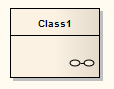
Right-click on the element in the diagram and select the Advanced | Make Composite context menu option The element displays (see Image on left) Note the small icon in the bottom right hand corner indicating that this is now a Composite element |
|
|
3 |
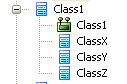
Double-click on the Composite element to access the child diagram that it points to The Composite element and its child diagram are represented in the Project Browser as shown Note that ClassX, ClassY and ClassZ are elements in the child diagram |
|
Topics:
Topic |
Detail |
See also |
|---|---|---|
Alternative Notation |
Composite elements can show their contents instead of their usual notation To enable this:
|
|
The Automation Interface |
Automation support is available for Composite elements Element has an Elements collection and a Diagrams collection |
Notes:
- If the Make Composite option is not listed in the context menu, the option is not available for the type of element you have selected
