
Please note : This help page is not for the latest version of Enterprise Architect. The latest help can be found here.
Assign Icons To Toolbox Items
To assign an icon to a toolbox item, follow the steps below
Step |
Action |
See also |
|---|---|---|
1 |
Create a new �stereotype� element in the same toolbox profile as the toolbox item. |
|
2 |
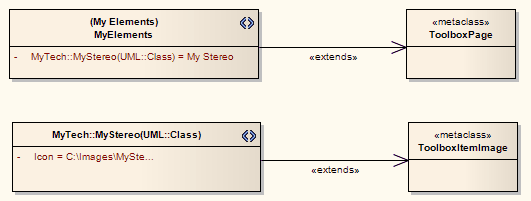
Give the �stereotype� element the same name as the attribute that it is assigning an image to (for example, MyTech::MyStereo(UML::Class) in the diagram below) |
|
3 |
Give the �stereotype� element an attribute named Icon with Initial Value set to the full path and file name of the image to be used. The icon image is a 16x16 pixel bitmap file; for a transparent background, use light grey - RGB(192,192,192). |
|
4 |
Create an Extends association from the �stereotype� element to a �metaclass� element named ToolboxItemImage. |
|
The material ("material" includes all pages, documents and on-line graphics) on this web site is protected by copyright law. (C) 1998-2011 Sparx Systems Pty Ltd.
