
Please note : This help page is not for the latest version of Enterprise Architect. The latest help can be found here.
Report Elements From External Packages
Elements can be re-used in different diagrams across a model; this can often mean that a diagram contains elements that are held in packages other than the diagram's parent package.
When generating an RTF report on a package, you might want to include elements that are not held in that package, but that are referenced in diagrams within the package. To do this you must:
| • | Select the appropriate diagram options on the Generate RTF Documentation dialog and/or the Diagram page of the diagram Properties dialog |
| • | Enable the appropriate template sections in the report template, as described in this topic |
Access Project Browser package context menu | Documentation | Rich Text Format (RTF) Report (F8)
How to
To enable the template sections
Step |
Action |
See also |
||||
|---|---|---|---|---|---|---|
1 |
Select the Rich Text Format (RTF) Report menu option. The Generate RTF Documentation dialog displays.
|
|
||||
2 |
In the Use Template field, click on the drop-down arrow and select the appropriate customized template (not a system-provided one).
|
|
||||
3 |
Click on the Edit Template button to display the RTF Template Editor.
|
|
||||
4 |
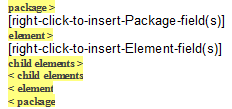
In the Sections panel on the left-hand side of the editor window, select the Package::Element checkbox. Selecting the checkbox adds the following set of sections to the Content panel of the template:
|
|
||||
5 |
Delete the [right-click-to-insert-Element-field(s)] text to leave a blank area. Right-click and select the Insert Field | Name context menu option, this inserts an Element.Name field in the template.
|
|
||||
6 |
In the Sections panel, select the Package::Diagram::Element checkbox. Selecting the checkbox adds the following set of sections to the Content panel of the template:
|
|
||||
7 |
To report on the linked elements in:
NB: Package::Diagram::Element, if left blank, replicates the format of Package::Element including sub-element sections (for example, Package::Element::Scenario), but excluding the Child Element section.
If using the Legacy RTF generator, the Element checkbox is automatically checked in your customized template, when you select the Document each contained element in RTF checkbox. Package::Diagram::Element does not have an option to add these sections.
|
|

Learn more
Learning Center topics
| • | (Alt+F1) | Reporting | RTF Templates | RTF Templates | Reporting Elements from External Packages |
