
Please note : This help page is not for the latest version of Enterprise Architect. The latest help can be found here.
Tabular Sections
The RTF Style Template Editor supports rendering a document section as a table. A tabular section is defined as a table containing any number of columns, but with only two rows:
| • | The first row is used to describe the headings of the columns, which you type in and format yourself |
| • | The second row defines the output, which you specify by right-clicking in each cell and selecting the output type from the field list; the output is then generated iteratively for every occurrence of the section in question |
Topics
Topic |
Detail |
See also |
|---|---|---|
Example Tabular Section |
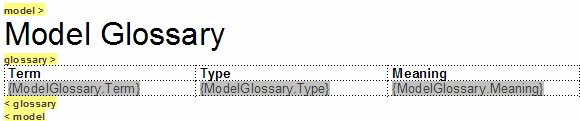
In the following example, the Model > Glossary > section is defined as a tabular section:
This renders the following document output:
|
|

Notes
| • | Under some circumstances, a table might repeat the header row rather than the output row; if this occurs, create another row in the table between the header row and the output row, and leave this blank |
| • | If you type a carriage return between the end of the table and the section terminator, the table you generate has a line space between the rows |

This generates the following table:
|
Element Name |
Author |
|
Choose Recipient |
John Redfern |
Line Space
|
Manage Contacts |
Walter Frederick |
To avoid this, ensure that there is no carriage return between the end of the table and the section terminator, as follows:
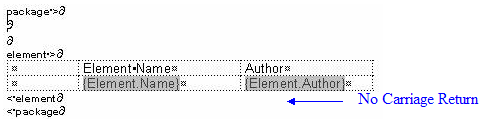
This generates a table with no space between the rows, as follows:
|
Element Name |
Author |
|
Choose Recipient |
John Redfern |
|
Manage Contacts |
Walter Frederick |
