
Please note : This help page is not for the latest version of Enterprise Architect. The latest help can be found here.
Edit Feature Stereotype
You can use the in-place editing feature to change the stereotype of an operation or attribute directly from the diagram. To use this feature, follow the steps below:
- Open the diagram containing the element.
- Click on the element, and on the item to edit within the element. The item line is highlighted in a lighter shade (the default is white), to indicate that it has been selected.
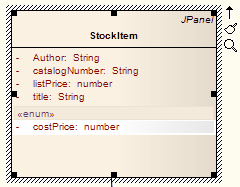
- Right-click on the item. The context menu displays.
- Select the Edit Selected menu option (or press [F2]) to enable you to edit the attribute or operation directly from the diagram. The name of the item is highlighted.
- Move the cursor to the position before the name or within the existing attribute or operation stereotype (denoted by «stereotype name»).
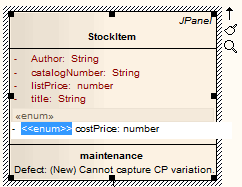
- Delete or type over the previous name to change the stereotype name of the attribute or operation.
- Press [Enter] to accept the change or [Esc] to cancel the change.
You can assign multiple stereotypes by including a comma-separated list inside the stereotype markers.
The material ("material" includes all pages, documents and on-line graphics) on this web site is protected by copyright law. (C) 1998-2010 Sparx Systems Pty Ltd.
