
Please note : This help page is not for the latest version of Enterprise Architect. The latest help can be found here.
Edit Parameter Kind
You can edit operation parameter kinds such as [in], [inout] and [out] directly from a diagram element by element, using the Element Keywords and Classifiers menu. This enables you to rapidly assign the parameter directly from a diagram. To use this feature follow the steps below:
- In Enterprise Architect, open the diagram containing the element.
- Click on the element, and on the operation to edit within the element. The item line is highlighted in a lighter shade (the default is white), to indicate that it has been selected.
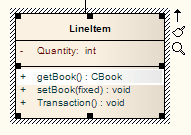
- Right-click on the item. The context menu displays.
- Select the Edit Selected menu option (or press [F2]) to enable you to edit the item directly from the diagram. The name of the item is highlighted.
- Right-click on the item name to display the context menu.

- Select the appropriate menu option for the parameter kind value: [in], [inout] and [out]. The diagram is updated to reflect the change.
The material ("material" includes all pages, documents and on-line graphics) on this web site is protected by copyright law. (C) 1998-2010 Sparx Systems Pty Ltd.
