
Please note : This help page is not for the latest version of Enterprise Architect. The latest help can be found here.
Project Roles
People associated with a project play a role in analysis, design or implementation, such as Application Analyst, Architect, Developer and Project Manager. Project roles define the activities that resources can undertake.
To define the role types that are captured within Enterprise Architect, select the Settings | People menu option and, on the People dialog, click on the Project Roles tab.
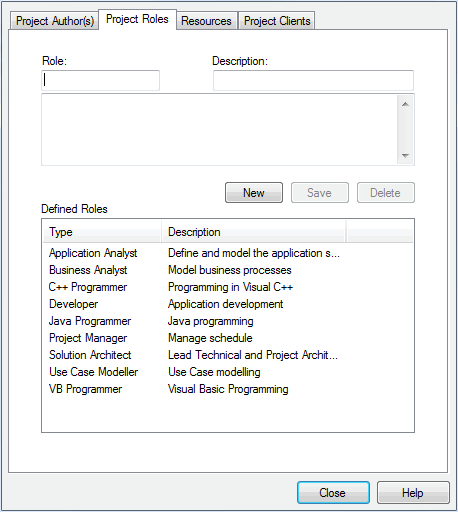
To add further roles, click on the New button and complete the fields as described below:
Option |
Use to |
Role |
Type the name of the role. |
Description |
Type a short description of the role. |
Notes |
Type any additional information related to the role. |
Defined Roles |
Review all roles that have been previously defined in Enterprise Architect. |
Click on the Save button to add the new role to the Defined Roles list.
The Defined Roles list is available for selection for any element in the model; for example, you can select roles on the Project Authors tab of the People dialog, and the Resource Allocation tab of the Project Management window. You can also specify other roles on these dialogs, but such roles are not added to the Defined Roles list.
To delete a role, click on the role type in the Defined Roles list and click on the Delete button.
Notes: |
|
