
Please note : This help page is not for the latest version of Enterprise Architect. The latest help can be found here.
Interaction Overview Diagram
One of four types of Interaction diagram. (The other three are Timing Diagrams, Sequence Diagrams and Communication Diagrams.)
Interaction Overview diagrams visualize the cooperation between other interaction diagrams to illustrate a control flow serving an encompassing purpose. As Interaction Overview diagrams are a variant of Activity diagrams, most of the diagram notation is the same, as is the process of constructing the diagram. Decision points, Forks, Joins, Start points and End points are the same. Instead of Activity elements, however, rectangular elements are used. There are two types of these elements:
- Interaction elements display an inline Interaction diagram, which can be any one of the four types
- Interaction Occurrence elements are references to an existing Interaction diagram: they are visually represented by a frame, with ref in the frame's title space; the diagram name is indicated in the frame contents.
To create an Interaction Occurrence, simply drag an Interaction diagram from the Project Browser onto your Interaction Overview diagram. The ref frame displays, encapsulating an instance of the Interaction diagram.
Example Diagram
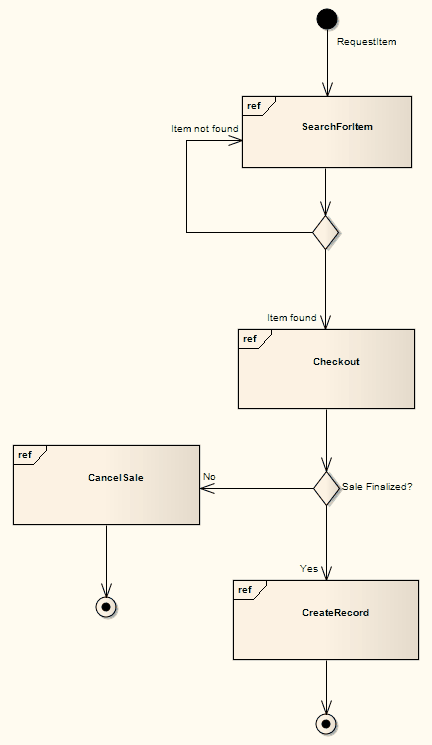
The following example depicts a sample sale process, shown in an Interaction Overview diagram, with sub-processes abstracted within Interaction Occurrences. The diagram appears very similar to an Activity diagram, and is conceptualized the same way; as the flow moves into an interaction, the respective interaction's process must be followed before the Interaction Overview's flow can advance.
Toolbox Elements and Connectors
Select Interaction Overview diagram elements and connectors from the Activity pages of the Toolbox.
Tip: |
Click on the following elements and connectors for more information. |
Interaction Overview Diagram Elements |
Interaction Overview Diagram Connectors |
|
|
|
|
|
|
|
|
|
|
|
|
|
|
|
|
|
|
|
|
|
|
|
|
|
|
















OMG UML Specification
The OMG UML specification (UML Superstructure Specification, v2.1.1, p. 514) states:
Interaction Overview Diagrams define Interactions (described in Chapter 14, "Interactions") through a variant of Activity Diagrams (described in Chapter 6, "Activities") in a way that promotes overview of the control flow.
Interaction Overview Diagrams focus on the overview of the flow of control where the nodes are Interactions or InteractionUses. The Lifelines and the Messages do not appear at this overview level.
