
Please note : This help page is not for the latest version of Enterprise Architect. The latest help can be found here.
Apply a User Lock
In the Require User Lock to Edit security mode, where a User Lock is required before any edit can occur, you can set or release the lock in either a diagram or the Project Browser.
Enterprise Architect adjusts the lock for the element, or for the diagram and any elements contained in the diagram.
In a diagram, you right-click on the element or diagram; in the Project Browser, you right-click on the package, diagram or element. In each case, select the Apply/Release User Lock context menu option for the selected item. The following dialog displays.
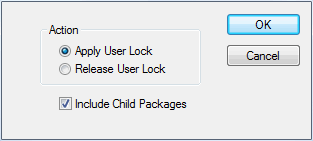
Select the appropriate radio button to apply or release a user lock on the selected item.
Note: |
For a package, you can elect to also lock all child packages at the same time. If any elements in the package tree are locked by other users, a list of elements that couldn't be locked displays at the end of the process. |
