
Please note : This help page is not for the latest version of Enterprise Architect. The latest help can be found here.
UML Elements Toolbar
The UML Elements toolbar can quickly and easily insert UML elements onto a diagram, including Notes, text, hyperlinks and diagram specific UML elements.
Access: View | Toolbars | UML Elements
Use to:
- Insert a variety of elements onto the current diagram
Reference:
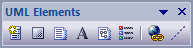
Action |
Usage |
Shortcut |
See also |
New Element |
Add a new element to the current diagram. Displays a list of elements matching the content of the current Toolbox pages, with an Other option to list other elements |
Space bar |
|
New Boundary |
Add a simple boundary element to the current diagram |
|
|
New Note |
Add a new Note element to the current diagram |
|
|
New Text Element |
Add a simple text element to the current diagram |
|
|
Diagram Note Element |
Add a diagram properties note to the current diagram |
|
|
Diagram Legend |
Add a diagram legend element to the current diagram |
|
|
New Hyperlink |
Add a hyperlink element (web page, file, help topic) to the current diagram |
|
|
New Note Link |
Create a note link connection from an element to a note in the current diagram |
|
Notes:
- You can move this toolbar to any dockable position and it retains that position in subsequent sessions
