Book a Demo

Author Topic: OCL in v6.1 Build 792  (Read 5665 times)

davisford

  • EA User
  • **
  • Posts: 63
  • Karma: +0/-0
    • View Profile
OCL in v6.1 Build 792
« on: August 02, 2006, 10:39:16 am »
Hi - we are interested in applying OCL in some UML models that serve the pupose of specification.  Therefore, more formality is better.  Henceforth, OCL would be nice to apply here.  

To get started, I grabbed a copy of http://www.amazon.com/gp/product/0321179366/ and I re-created the sample class model in the book for the "Royal & Loyal" example (Chapter 2).  The class diagram looks like this:
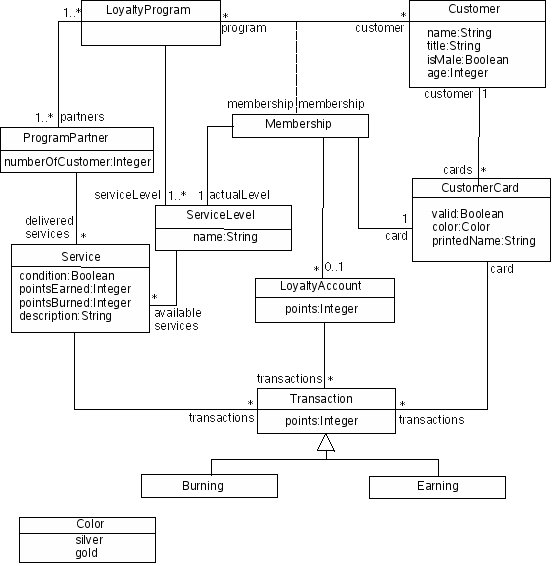
-- taken from this website: http://maude.sip.ucm.es/itp/ocl/examples.html

I re-drew this in EA as a class diagram, and tried adding my own OCL constraints to it, and then doing model validation.

For example, I added this OCL constraint:

Code: [Select]

context LoyaltyProgram
inv minServices: partners.deliveredServices->size() >= 1


However, in EA, you do this by opening the Properties page of the LoyaltyProgram class, hitting the Constraints tab...then adding a new Constraint of Type OCL.  In the Constraint box, I typed the name
Code: [Select]
minServices, and in the box that follows I typed:

Code: [Select]

inv minServices: partners.deliveredServices->size() >= 1


You don't need to have the

Code: [Select]

context LoyaltyProgram


part because this is implied via the GUI.  In fact if you add the context part, it fails OCL validation.

So, when I hit Save, a box pops up and tells me "OCL validation Successful" -- seemingly indicating to me that the OCL syntax is correct.

However, if I select the LoyaltyProgram class, and do CTRL+ALT+V (do model validation on this element), it reports to me:

Code: [Select]

MVR040001 - warning (LoyaltyProgram (Class)): OCL violation: inv minServices: partners.deliveredServices->size() >= 1


So, it is giving me a warning that this is in violation of the constraint.  Two things I don't understand here:

1. Why is this in violation?
2. If it is in violation (which I don't believe it is), why is this a warning and not an error?


davisford

  • EA User
  • **
  • Posts: 63
  • Karma: +0/-0
    • View Profile
Re: OCL in v6.1 Build 792
« Reply #1 on: August 02, 2006, 10:51:22 am »
Ok, here's another really, really trivial example:

Create a class diagram.  Add a new class => Class1.

Add an Attribute called "someNumber" of type int to Class1.

Add a Constraint to Class1 of type OCL.

Name the constraint "minNumber" and add the OCL code:

Code: [Select]

inv minNumber: someNumber >= 5


Save -> OCL Validation Successful.

Now select Class1 on the class diagram, and do CTRL+ALT+V for model validation.  

You will get a warning that the OCL invariant is violated -- why?  I don't know.

Now try this:  

Open the properties page for the attribute someNumber, and fill in the initial value as '6'.

Now re-run the model validation.  It still fails.  Intuitively, the only guess I had as to why the OCL invariant was violated was b/c there was no initial value to compare against -- but this is not the case.

Any clues?

SF_lt

  • EA User
  • **
  • Posts: 216
  • Karma: +1/-0
  • The Truth Is Out There
    • View Profile
Re: OCL in v6.1 Build 792
« Reply #2 on: August 08, 2006, 03:51:10 pm »
I wouldn't rely on the EA's OCL - OCL validation really sucks and this haven't changed for a while. You can search forums for more OCL "working" reports  :-/
registertm everything to SparX

thomaskilian

  • Guest
Re: OCL in v6.1 Build 792
« Reply #3 on: August 09, 2006, 12:54:33 am »
Although Simon claimed this to work after having succeeded two or three test cases :(

SF_lt

  • EA User
  • **
  • Posts: 216
  • Karma: +1/-0
  • The Truth Is Out There
    • View Profile
Re: OCL in v6.1 Build 792
« Reply #4 on: August 09, 2006, 04:15:44 am »

yeah, yeah, those test cases looked like these invariants

inv: 2 < 3 and inv: 2 > 3

there is nothing to add about such test cases - there could only one conclusion - OCL validation in EA really works ;D
registertm everything to SparX

mikewhit

  • EA User
  • **
  • Posts: 608
  • Karma: +0/-0
  • Accessing ....
    • View Profile
Re: OCL in v6.1 Build 792
« Reply #5 on: August 22, 2006, 01:21:33 am »
If you get your bug report in quickly (with some good test cases), the fix might just make it into the next release ...?

SF_lt

  • EA User
  • **
  • Posts: 216
  • Karma: +1/-0
  • The Truth Is Out There
    • View Profile
Re: OCL in v6.1 Build 792
« Reply #6 on: August 24, 2006, 04:06:06 pm »
are they going to fix OCL, that it really would work? Simonn, KP...

EA 6.5 is out :)  Release notes don't talk about OCL at all
« Last Edit: September 07, 2006, 12:17:25 am by SF_lt »
registertm everything to SparX

Dave_Bullet

  • EA User
  • **
  • Posts: 295
  • Karma: +0/-0
    • View Profile
Re: OCL in v6.1 Build 792
« Reply #7 on: September 21, 2006, 02:24:29 pm »
Bump.  Hi Sparx.  Is OCL broken in EA?  If so - any plans to fix?

Thanks,
David.
"I know I'm close to a good design, but it's like the balloon animals, squeeze in one spot and the problem moves down the line"

SF_lt

  • EA User
  • **
  • Posts: 216
  • Karma: +1/-0
  • The Truth Is Out There
    • View Profile
Re: OCL in v6.1 Build 792
« Reply #8 on: September 25, 2006, 06:08:48 am »
let's say - not broken, however is at state, when it's present, but unusable in non-primitive cases. On other hand, it seems, that there is no big demand for this feature from users community
registertm everything to SparX

mikewhit

  • EA User
  • **
  • Posts: 608
  • Karma: +0/-0
  • Accessing ....
    • View Profile
Re: OCL in v6.1 Build 792
« Reply #9 on: September 25, 2006, 06:39:29 am »
Well if it doesn't work, no-one will try it and find it useful ...

SF_lt

  • EA User
  • **
  • Posts: 216
  • Karma: +1/-0
  • The Truth Is Out There
    • View Profile
Re: OCL in v6.1 Build 792
« Reply #10 on: September 25, 2006, 07:13:01 am »
something like a closed loop
registertm everything to SparX