Book a Demo

Show Posts

This section allows you to view all posts made by this member. Note that you can only see posts made in areas you currently have access to.


Messages - EAabecedarian

Pages: [1]
1
So what I learned: there's a media break between UML (which is excellent to model customer views up to a technical design) and IDEs (which support coding in all directions like code intellisense, debugging, etc.). Give the modelers/architects a good UML tool and gibe the coders a good IDE. And the real issue to get the technical part (SDs upward) being documented by coders EASILY. EA is not the best for the latter, unfortunately.

I agree that UML (EA, respectively) is too often not the best way for the detailed design part, i.e. to describe how the code shall actually work.
But somehow I have to ensure "traceability" between high level requirement, architecture, design and eventually the code.
Of course, "code reviews" are one way to catch the "media break" you mentioned, and they are inevitable anyway wherever manual coding is done.
Yet I'm still not convinced that - at least for the interfaces part - code generation brings no benefit in this point (and it seems that with EA there doesn't have to be tags or other fancy stuff).
Yes, this is just a small part and can be easily done during code review, but whatever can be automated eliminates human error (unless the automation process is errorneous :-D ) .
Anyway, I appreciate your and Geert's comments and will rethink my idea :-)

BR,

EAabecedarian
2
Hi Takeshi.

In the User Preferences, Attribute/Operations Group, enable 'On forward synch, prompt to delete code features not in model'

Thanks! At the first glance this seems to solve my problem. Even existing code in the function body is kept.

Quote
Since EA does not add tool-specific marks in source files, EA cannot distinguish changes from additions/deletions.

Yes, but it could do - and when checking the option you mentioned it obviously does - some "intelligent" code parsing.

BR,

EAabecedarian

3
Nothing you would like to hear, but I tell it anyway: code generation is a Fata Morgana. It does not bring any value to generate code.

q.

Thanks for your input. Maybe you are right. But what I've experienced is that once the SW design is done (if it is at all), developers don't really care any longer.
However, there usually isn't just one iteration. In the end you have a code that doesn't match the design and/or architecture because of changed parameters, added or deleted functions, etc.
Code review is tedious and nobody has really time for it.
Of course, discipline and a dedicated software architect having time to track would help.
But I thought it would be beneficial if there could be at least some automated process for all that interface stuff:
Let the code generator run, and if afterwards the build won't work anymore the developer MUST take care of updating the design - or stick to it.

BR,

EAabecedarian

4
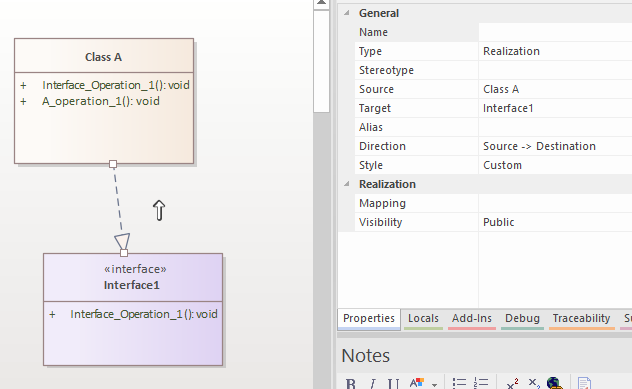
To get some link between a software model and the C code, my idea is to model interfaces and classes and generate *.h and *.c files just containing the declarations and function definitions with empty bodies.
The implementation of the functions shall be done by "classic" programming using that generated skeleton plus additional information from some specification (which also could be a EA diagram or state machine or whatever).

My first experiments on this show that "synchronization" between model and code works this way that previously generated code is not touched but only additional model elements are added.
This means also that changing existing elements simply adds new code to reflect the change but keeps the already existing code.

For instance:
From the very basic model below three files "Class A.c", "Class A.h" and "Interface1.h" are generated and they look perfectly fine.


If I add a second operation "A_operation_2" to Class A, its declaration is added as expected.
Now I change "A_operation_2" to take an int parameter "a". The "Class A.h" then has two declarations for operation "A_operation_2":

void A_operation_2();
void A_operation_2(int a);

Also, the implementation of "A_operation_2(int a)" is added to "Class A.c".
What I would like: Just add the new parameter to the existing generated code.

When removing A_operation_2(int a) from "Class A" and doing a new generation, the files don't change at all.
What I would like: Remove A_operation_2(int a) declaration and definition from generated code.

I know that "Overwrite" instead of "Synchronize" would solve that problem, but this would also overwrite any implementation done e.g. in "A_operation_2"'s body after the function parameter has been added.

Is there a way to make code generation more intelligent, i.e. to check for the same name(s) and update only the function declarations and headers?
Or is there a better strategy to force the developers to stick to the model but not burden them the load of dealing with EA for every single detail in code?

Best regards,

EAabecedarian

5
EA 15.2:
To trace requirements, I'd like to use a Relationship Matrix.

When I open the Matrix, I can manually modify Source or Target to perform a Model Search on, for instance, a predefined Search pattern from "My Searches".
So I can have the "Requirements" as Source, and a selection of relevant other elements (e.g. Interfaces and Classes) as Target.

But when I use "Right click" -> "Documentation" -> "Edit Matrix Profile..." on my "MatrixSpecification" block, I can only select one specific Package as Source/Target.

Actually my idea was to have a "MatrixSpecification" block somewhere in the model, and a simple double click shall open it.
But without being able to specify a model search there, this will not work.
What can I do to solve my problem? Use a script to create that Matrix?

BR,

EAabecedarian

6
Thx Geert! It works  :)
And after searching for "drawnativeshape" I found this section: https://sparxsystems.com/enterprise_architect_user_guide/15.2/modeling/add_custom_compartments_to_ele.html
Script example 2 goes in the same direction.

BR,

EAabecedarian

7
Here's from the User Guide what confuses me:
Quote
Shape Scripts operate on the basis that the default (UML) representation is used unless the script contains an alternative definition.
[...]
If you have an empty shape routine, it overrides the default; so, a blank 'shape label' prevents the creation of the normal floating text label for elements that have them

For my MDG, I'd like to override only the border color of a stereotyped "Component" based on some tagged value:

shape main{
   v_align="center";
   h_align="center";
   
   // Check the tagged value "TV1" and set border colour accordingly   
   if (hastag("TV1", "Red Type"))
   {
      setpencolor(255, 0, 0);
   }
   
   if (hastag("TV1", "Green Type"))
   {
      setpencolor(0, 255, 0);
   }

   if (hastag("TV1", "Blue Type"))
   {
      setpencolor(0, 0, 255);
   }
}

With this, any element of that stereotype I add to a diagram is there, but "invisible", so I see no border, no filling, no text, etc.
Is this because my existing "shape main" is actually interpreted as "empty" and thus overriding EVERYTHING, so only the pen color applies (which, of course, has no effect without any drawing specified)?
Do I really have to add the other definitions manually, or is there a way to keep the shape's default?

BR,

EAabecedarian

8
General Board / Re: Run script at element creation?
« on: February 08, 2022, 05:23:28 pm »
Thank you both! I'll have a look... :-)

9
General Board / Run script at element creation?
« on: February 07, 2022, 11:24:19 pm »
I'm setting up an MDG which, for instance, provides an element "Software Component" based on "Component" metaclass.
Generating and using that MDG works fine so far.
Now I'd like to create several packages and diagrams to add more details on each software component (e.g. Structural and Sequence diagrams).
I can write a script for this, select each Software Component and run it manually - would work, but is time consuming.

Is there a way to trigger that script once each time a new "Software Component" is created?
And if so, can it be integrated in the MDG?

BR,

EAabecedarian

10
General Board / Re: Project Integrity Check: No jump to element?
« on: October 26, 2021, 01:11:11 am »
Ok, I think I can live with it for now  :)
I'll take care to not get such confusion in my (really tiny) own models.
THX!

11
General Board / Re: Project Integrity Check: No jump to element?
« on: October 26, 2021, 12:40:41 am »
Simply always recover/clean all issues.

Geert

And simply ignore the warning "This recovery tool could make substantial changes to your model"?  :-\
Btw: The new Report after Recover/Clean is identical to the one before :o
So I don't only not know where the issues are caused but also have no chance of easily getting them fixed...
Could it be that that model has just grown too big (eap file size is 76MB) for the Integrity check to work as intended?

12
General Board / Project Integrity Check: No jump to element?
« on: October 25, 2021, 11:47:03 pm »
Hi EAexperts.

Somewhere I read the recommendation to run the "Project Integrity Check" as often as possible, which sounds quite reasonable.
I understand that if someone follows that recommendation, the result list may be very short and it's easy to find where the integrity issue was caused.
Out of curiosity, I ran it for the Autosar BSW UML model (https://www.autosar.org/fileadmin/user_upload/standards/classic/20-11/AUTOSAR_MOD_BSWUMLModel.zip).
It tells me about 1200 inconsistencies as a long list with multiple identical "items" in the dialog window.
But there's no context menu and I can't even doubleclick on an item to jump to the causing model element.
Is something wrong here or do I expect too much and there simply is no other option than "Recover/Clean" all issues?

Pages: [1]